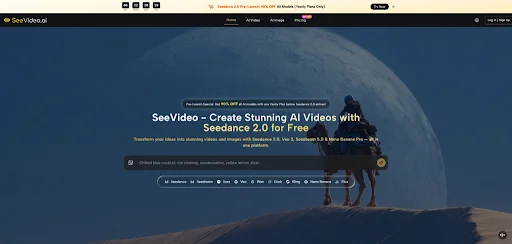
The latest wave of video models has created a familiar problem: more model names, more demos, and more uncertainty about where practical creation actually begins. That is why Seedance 2.0 feels worth examining now. Instead of presenting one narrow generator, the platform frames itself as a broader creation workspace built around AI video and image making, with Seedance positioned as the headline draw.
I approached it less like a launch announcement and more like a product read-through for real creators. The test lens was simple: what does the official site clearly show, what kind of workflow does it encourage, and what does that imply for short-form video makers, marketers, and visual experimenters who need something more usable than a gallery of flashy demos. That framework matters, because in AI creation tools, the difference between promise and practice is usually hidden in the interface, the prompt flow, and the kind of examples a platform chooses to surface.
Why This Platform Feels Timely To Evaluate
What makes this platform interesting is not just the mention of Seedance. The homepage presents a wider stack: AI video, AI image, and a prompt library sitting in one place. From a practical user perspective, that suggests a workflow built around idea entry, prompt inspiration, and generation, rather than a single isolated model page.
That framing matters in today’s market. Many tools still ask users to arrive with strong prompting instincts, clear visual language, and enough confidence to troubleshoot their own results. Here, the official pages appear to reduce that friction by showing example prompts, ready-made inspiration, and multiple model families on the same surface. It is a more editorial presentation of creation, not just a blank technical console.
The Testing Framework Behind My Assessment
To keep the read grounded, I looked at the platform through five questions: how clear the entry point is, how much creative guidance the page provides, whether the examples feel visually varied, how the image and video sides connect, and what kinds of users would benefit most from that structure.
On those terms, the site makes a reasonably strong first impression. The homepage centers a direct “describe your idea” input field, then surrounds it with example-driven inspiration. The prompt examples are not abstract placeholders either. They range from slow-motion food close-ups to sci-fi mecha shots and fantasy battle scenes. That matters because it shows the product is trying to teach users what a workable prompt looks like, not merely persuade them with a slogan.
How The Official Workflow Actually Unfolds
The official pages suggest a workflow that is refreshingly visible. Rather than burying the process behind a complicated dashboard, the site presents the path in plain view: start with an idea, learn from examples, and generate from that foundation.
Step One Starts With A Plain Language Idea
The first step is straightforward: the platform invites users to describe their idea in natural language. That is the clearest official entry point shown on the homepage and image page, and it sets the tone for the rest of the experience.
The Main Input Box Defines The Entry Point
What stands out here is the lack of mystery. You are not pushed first into a maze of settings. You are asked for an idea. For new users, that reduces hesitation. For experienced users, it shortens time to first output. In practical terms, that makes the tool feel oriented toward momentum rather than technical ceremony.
Step Two Builds From Curated Prompt Examples
The second step becomes visible once you move past the initial box. The platform provides curated prompt examples and a separate prompt library page focused on Seedance-style video prompting, including example outputs and “Use It” or “Copy it” actions.
The Prompt Library Lowers The Blank Page Pressure
This is one of the most useful parts of the public workflow. Good AI creation often depends on prompt structure, scene sequencing, and sensory detail. The example library helps users see that difference. A prompt about roasted street corn focuses on lighting, texture, steam, and close-up framing. Another prompt describes a vertical fashion editorial scene with a gown made of flower petals. Those details signal that the product understands visual prompting as craft, not as a single sentence.
Step Three Moves From Inspiration To Generation
The third step is where the workflow closes the loop. The site repeatedly encourages users to take an idea or example prompt and turn it into a generation through the same platform environment.
The Core Benefit Is Fewer Creative Hand Offs
This is where SeeVideo AI becomes more compelling than a simple model landing page. A user can move from example to prompt to creation without switching mental context. That does not guarantee perfect outputs, but it does make the process feel more continuous. For working creators, continuity often matters more than flashy wording.
What The Visual Examples Reveal In Practice
The site’s public examples do some real work here. They show a clear appetite for cinematic prompting: macro food shots, cyberpunk humor, sci-fi flythroughs, editorial fashion, nostalgic VHS texture, and environment-driven fantasy scenes. That variety helps establish that the platform is not locked into one aesthetic lane.
For video-first users, the strongest signal is that the prompt examples think in shots, movement, atmosphere, and transitions. Some prompts describe tracking shots, seamless motion, pacing, and mood arcs. That is useful because it aligns better with how video creators think. It moves beyond still-image description and toward scene construction.
For image-first users, the separate image page also matters. It suggests a broader workflow in which still images and video coexist rather than compete. If you create visual concepts, mood references, or campaign assets before exploring motion, that combined structure can be more practical than starting from video alone.
How It Compares With Simpler Creation Paths
A fair evaluation needs a baseline. Not every creator needs a multi-surface platform, and not every project benefits from prompt libraries or multiple model labels. The question is whether the structure offers practical advantages.
| Evaluation Factor | This Platform’s Approach | Simpler Single Surface Tools |
| Entry barrier | Clear idea box and visible examples | Often clear, but less guided |
| Prompt support | Dedicated prompt examples and reuse flow | Usually lighter or absent |
| Creative range | Video and image paths shown together | Often narrower |
| Learning curve | Moderate, but supported by examples | Can be lower or confusingly bare |
| Best fit | Creators exploring workflows | Users wanting one quick task |
The table points to the main trade-off. This platform seems better when you want guidance, inspiration, and a broader creative workspace. A simpler tool may still win if your only goal is one quick output with minimal exploration.
Where It Works Best Across Real User Scenarios
For marketers, the value appears strongest in fast concept development. If you need product mood videos, campaign visuals, or pitch-ready creative directions, the prompt-led structure can speed up ideation. The examples help translate vague briefs into visual language.
For short-form creators, the platform seems most useful when you care about stylistic variety. The public examples lean cinematic and scene-aware, which may help with reels, teaser clips, and social storytelling. That said, results will still depend heavily on prompt clarity, and polished outputs may require iteration.
For image creators stepping into motion, the combined video and image presentation is arguably the biggest advantage. You are not being asked to abandon still-image thinking. Instead, the platform appears to support a broader visual workflow where one mode can feed the other.
The Real Limits Are Worth Saying Clearly
This is not a case where restraint should disappear. The public site is persuasive, but public pages are not the same thing as exhaustive product documentation. Some important operational details are not spelled out in a fully concrete way on the pages I reviewed, so it would be dishonest to overstate certainty around performance boundaries or output consistency.
In my reading, the main limitation is the familiar one shared by most AI creation tools: prompting quality still shapes the outcome. Complex scenes, multi-part actions, or very specific stylistic intentions may require more than one attempt. It also appears likely that users who want tight control over consistency will still need to learn how to describe scenes with precision. The platform helps with that learning curve, but it does not remove it.
Why It Deserves Attention From Practical Creators
The strongest case for this platform is not that it claims to be the most powerful thing online. The stronger case is that it packages modern AI creation in a way that feels easier to enter, easier to study, and easier to apply. The visible workflow, the example-rich prompt culture, and the connection between image and video pages make it feel more usable than many tools that rely on raw novelty alone.
If your work involves turning rough ideas into visual concepts, or if you want a more guided path into AI video without starting from a blank screen every time, this is the kind of platform that deserves a serious look. Not because it eliminates creative friction, but because it appears to organize that friction into a process people can actually use.