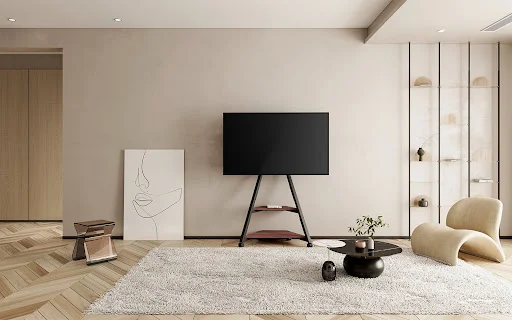
Picking the right TV stand for 65-inch TV is all about finding the perfect balance of size, stability, storage, and room flow. A 65-inch screen is large enough to become a focal point in your home, which makes choosing the right stand even more important. The right setup improves viewing comfort, organizes your devices, and helps your space look clean and balanced. This guide walks through simple, practical steps to help you make a confident and well-informed decision.
How To Choose The Correct Size For A TV Stand For 65-Inch TV?
Step 1 – Measure The Actual Width Of The 65-Inch TV
A common mistake is assuming that a “65-inch TV” is 65 inches wide. TV sizes are measured diagonally, so the actual width of most 65-inch models is around 57 inches. Measuring the true width helps you choose a stand that creates proper support and visual balance.
Step 2 – Follow The Ideal Stand Width Formula
A reliable guideline is:
TV Stand Width = TV Width + 4–8 inches.
This means a stand between 62 and 75 inches typically fits a 65-inch TV best. A wider stand improves stability, prevents the TV from looking crowded, and creates room for décor or a soundbar.
Read more insights closely related to what matters most to you.
Step 3 – Choose The Right Stand Height For Eye-Level Viewing
For comfortable viewing, the center of the screen should align with seated eye level—usually between 36 and 42 inches depending on the height of your sofa. A stand that’s too low can cause neck strain, while one that’s too high disrupts the viewing angle. Check the stand height before buying to ensure an ergonomic setup.
Step 4 – Check Stand Depth And Weight Capacity For Safety
A depth of 12–16 inches works well for most setups, but if you have larger devices like gaming consoles, look for deeper shelves. Because a 65-inch TV is fairly heavy, always check weight limits. Choose a stand built with sturdy materials such as metal frames or solid wood to ensure long-term stability.
Step 5 – Plan Extra Space For Future TV Upgrades
If there’s even a slight chance you’ll upgrade to a 70-inch or 75-inch TV later, choose a wider stand now. This prevents the need to replace the furniture and keeps your setup adaptable as your home entertainment needs evolve.
Storage And Cable Management Tips For A 65-Inch TV Setup
Decide How Much Storage You Actually Need
A large TV often comes with multiple devices—soundbars, streaming boxes, controllers, consoles, or routers. Before choosing a 65-inch TV stand, list your devices and decide whether you prefer open shelves, drawers, or closed cabinets. This helps keep the area organized and reduces clutter.
Open Shelves vs. Closed Cabinets For Large TV Systems
- Open shelves increase airflow for consoles and speakers, making them ideal for gamers or heavy device users.
- Closed cabinets hide clutter and keep the room looking minimal and clean.
Many people prefer a hybrid design that combines both.
How To Keep Cables Clean With A Large TV Setup?
Cable clutter becomes more noticeable with a large entertainment stand for big TVs. Look for features like:
- Built-in cable cutouts
- Rear routing channels
- Clips and ties for bundling cables
A few minutes of cable organization can instantly make the entire area look tidy.
How To Arrange Devices For Better Ventilation And Performance?
Electronics like game consoles and routers need airflow. Avoid pushing devices too close to the back panel. Leave at least 2–3 inches of breathing room and place power bricks away from heat-sensitive equipment to prevent overheating.
Room Layout And Space Planning For A TV Stand For 65-Inch TV
How Much Wall Space You Need For Best Visual Balance?
A 65-inch TV looks best on a wall that is at least 8 feet wide. This creates enough space on each side to maintain balance. If your wall is narrow, consider a minimalist or open-frame TV stand to keep the area looking light.
Choosing The Best Seating Distance For A 65-Inch TV
For comfort and visibility, the ideal seating distance is around 9 to 12 feet from the TV. This range helps avoid eye strain and enhances viewing quality.
How To Use Décor To Soften The Large Screen?
Because a 65-inch screen takes up visual space, adding décor can help balance the wall. Try:
- Tall plants
- Vertical artwork
- Table lamps
- Floating shelves
These elements keep the TV from overpowering the room.
Avoiding Overcrowding In Smaller Rooms
If your living room is compact, choose a narrow-depth or open-frame stand. These designs reduce visual weight and prevent the TV area from feeling tight.
Common Mistakes To Avoid When Choosing A TV Stand For 65-Inch TV
Measuring Only The TV Diagonal Instead Of Actual Width
This leads to buying a stand that is too small.
Buying A Stand That’s Too Small For The Wall Or Room
A narrow stand makes the TV look oversized and unstable.
Ignoring Cable Routing And Ventilation For Devices
Poor airflow causes consoles and routers to overheat.
Overlooking Weight Capacity, Stability, And Safety
Always choose sturdy materials with strong load support.
Choosing Style First Without Considering Function
A pretty stand that lacks storage, depth, or ventilation becomes frustrating quickly.
By keeping these common mistakes in mind, it becomes clearer which features truly matter in a TV stand for a 65-inch TV—stable construction, proper width, efficient cable routing, and practical storage. Choosing a stand that prioritizes these essentials can save time, reduce setup frustration, and improve the overall viewing experience. Many brands interpret these needs differently, and some designs meet them more effectively than others.
About FITUEYES
FITUEYES is a modern furniture brand designed around these exact priorities. The brand focuses on creating TV stands that pair clean aesthetics with structural stability, making them especially suitable for large screens like a 65-inch TV. Many FITUEYES designs feature widened support surfaces, reinforced metal frames, and balanced proportions that help maintain stability and prevent visual overcrowding on larger walls.
Beyond construction, FITUEYES also incorporates practical details that address common setup frustrations. Adjustable shelves support different device heights, open-back structures improve airflow for consoles and routers, and built-in cable pathways help maintain a clean, organized entertainment area. These thoughtful features make it easier to create a functional, visually balanced setup without needing additional accessories or complicated adjustments.
Whether the goal is better cable management, more storage versatility, or a stand that simply feels solid and well-proportioned beneath a 65-inch TV, FITUEYES offers solutions aligned with the core needs highlighted in this guide.
Frequently Asked Questions About Choosing A TV Stand For 65-Inch TV
Q: What Size TV Stand Do I Need For A 65-Inch TV?
A stand between 62–75 inches wide provides the best balance and support.
Q: What Is The Recommended Height For A TV Stand?
Choose a height that places the TV’s center at eye level—around 36–42 inches.
Q: Is A 65-Inch TV Too Big For My Living Room?
With proper seating distance (9–12 feet), most medium to large rooms can comfortably support a 65-inch TV.
Q: Should A TV Stand Be Wider Than The TV?
Yes. A wider stand offers better stability and looks more visually balanced.
Q: Is A TV Console Better Than An Entertainment Stand For Large TVs?
TV consoles provide a clean, streamlined look, while entertainment stands often offer more storage. The choice depends on layout and organizational needs.
Final Thoughts On Choosing A TV Stand For 65-Inch TV
Choosing the right stand comes down to accurate measurements, thoughtful storage planning, and creating balance within the room. A well-chosen stand supports comfort, safety, and visual harmony in your space. For those looking for stylish, sturdy options, FITUEYES offers designs that blend stability with modern simplicity—making it easier to build a clean and comfortable home theater setup.
Unlock more content designed to spark ideas and drive action at Management Works Media.