There’s a specific kind of frustration that shows up around the third or fourth session with any AI image tool. The first session felt like a revelation. The second was more deliberate. By the third, you’re starting to notice the gap between what you imagined and what keeps appearing on screen — and you’re not sure whether the problem is your prompts, your expectations, or the tool itself Banana AI.
That gap is worth examining before it gets misread.
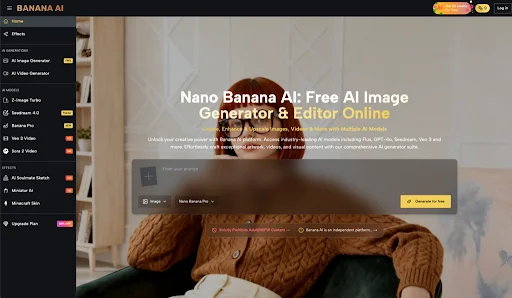
Banana AI positions itself as a free, all-in-one AI image creator and editor. It offers access to multiple generation models — including Flux, Nano Banana, and GPT-4o — and covers both text-to-image creation and photo editing within a single platform. That’s a meaningful scope for a free offering. But scope alone doesn’t tell you much about whether it fits how you actually work.
The First Impression Can Be Misleading When You’re Measuring the Wrong Thing
Most people who try an AI image tool for the first time are measuring novelty. The image appeared. It looks roughly like what I described. That’s impressive.
What they’re not measuring yet: how much revision that image will need before it’s usable. How many attempts it takes to get something close to a specific visual idea. Whether the output quality holds across different prompt types, or whether it’s strong in one register and inconsistent in another.
The first session with Banana AI — or any multi-model image platform — tends to reward broad prompts and punish narrow ones. Ask for “a moody forest at dusk” and you’ll likely get something atmospheric. Ask for “a flat-lay product photo of a matte black water bottle on a white marble surface with soft side lighting” and the result will depend heavily on how well the model interprets commercial-style constraints.
That’s not a criticism specific to this tool. It’s a structural feature of how text-to-image generation currently works. But beginners often don’t separate these two experiences in their early evaluation. They carry the optimism of the broad-prompt success into the narrow-prompt attempt, and then feel disproportionately disappointed when the second image misses.
What Multiple Models Actually Changes — and What It Doesn’t
Having access to Flux, Nano Banana, and GPT-4o in one place is genuinely useful for a specific kind of user: someone who already has a rough sense of what different model families tend to produce, and who wants to compare outputs without switching platforms.
For that person, the multi-model structure reduces friction in a meaningful way. You’re not logging into three different tools, managing three different interfaces, reconciling three different prompt syntaxes. The comparison happens in one place.
For someone earlier in their AI image journey, the same feature can create a different kind of confusion. Which model should I use for this? Why did the same prompt produce such different results? Is one of these better, or just different? These are reasonable questions, and they don’t have quick answers. Model selection is itself a skill that develops over time, through trial, preference formation, and a growing sense of what each model handles well.
What tends to happen with multi-model platforms is that early users either pick one model and stick with it — effectively ignoring the variety — or they cycle through all of them on every prompt, which slows the workflow considerably and makes it harder to build intuition about any single model’s behavior.
Neither pattern is wrong. But it’s worth knowing which one you’re likely to default to.
The Editing Side: A Different Kind of Evaluation
Combining generation and editing in one platform is a structural convenience. Whether it’s a meaningful workflow advantage depends on what you’re actually trying to edit.
AI-assisted photo editing tends to work well for certain categories of tasks — background manipulation, style adjustments, broad compositional changes — and less predictably for tasks that require precise spatial control or fine detail preservation. That’s a general observation about the category, not a specific claim about Banana AI’s editing capabilities, which I can’t assess beyond what the product description confirms.
What’s worth noting is that the editing side of an all-in-one platform often gets evaluated differently than the generation side. Generation is judged on output quality. Editing is judged on whether it saves time compared to doing the same thing manually. The threshold for “good enough” is different, and the frustration pattern is different too.
If you come to the editing tools expecting Photoshop-level precision, you’ll likely be disappointed. If you come expecting a faster way to make rough adjustments to AI-generated images before using them, the bar is lower and the experience is more likely to meet it.
What Cannot Be Concluded From the Available Information
This is worth stating plainly: the product description for Banana AI confirms model access, the free positioning, and the combined generation-and-editing scope. It does not confirm output consistency across use cases, generation speed under real conditions, how the editing tools perform on complex images, whether the free tier has meaningful limitations, or how the platform compares to paid alternatives on any specific quality dimension.
Anyone making a strong judgment about Banana AI’s suitability for professional or commercial use — based on a few sessions and a product description — is outrunning the evidence. That includes positive judgments and negative ones.
The more honest evaluation question isn’t “is this tool good?” It’s “does this tool produce usable starting points for the kind of images I actually need, at a frequency that justifies the time I spend prompting and revising?”
That question takes longer to answer. It requires more than one session, more than one use case, and some honest accounting of how much post-generation work the outputs require.
Where the Decision Actually Lives
After several sessions with any AI image tool, the novelty stabilizes and the real evaluation begins. You start to notice which prompt structures work for you. You develop a rough sense of which model handles your typical requests more reliably. You figure out whether the editing tools are part of your actual workflow or just available in theory.
At that point, the decision is less about the tool itself and more about whether your visual needs are well-matched to what text-to-image generation currently does well.
Banana AI Image‘s free, multi-model structure makes it a reasonable place to run that evaluation without financial commitment. The access to multiple models means you’re not locked into a single generation style while you’re still figuring out what you want. The combined editing environment means you don’t have to export and re-import to make basic adjustments.
Whether that’s enough depends on what you bring to it — specifically, a willingness to treat early outputs as drafts, not deliverables, and to let the tool’s behavior teach you something about your own visual instincts before you decide whether it’s worth continuing.
That’s not a low bar. But it’s the right one.