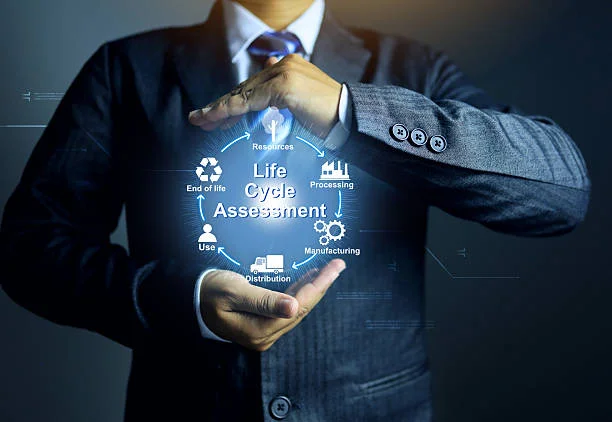
The United Nations reports an alarming 62 million metric tons of e-waste generated in 2024. Selling your IT equipment instead of throwing it away helps reduce this environmental burden and lets you recover much of your investment’s value Lifecycle of IT Equipment.
Your equipment’s lifecycle management success depends on knowing the best time to sell your hardware. The right timing helps you get maximum returns and supports environmental sustainability. Refurbished hardware can match new equipment’s performance at just a quarter of the cost. This creates value for both buyers and sellers.
This piece shows you the signs that your IT assets are ready to sell, the steps to prepare them properly, and the best marketplace options available. The complete equipment lifecycle process will help you make smart choices about your IT assets, whether you’re updating your company’s infrastructure or handling personal tech upgrades.
Same roots, different bloom—discover what grew alongside this post.
Understanding the IT Equipment Lifecycle
The equipment lifecycle plays a vital role for organizations that want to get the most value from their technology investments. Equipment doesn’t just show up and vanish – it goes through a well-laid-out experience that can affect your bottom line a lot if managed properly.
What is Equipment Lifecycle Management?
Equipment lifecycle management is a systematic way to oversee IT assets from the original planning until disposal. It works as a structured methodology to track, manage, and get the best results from your technology resources throughout their useful life.
Today’s businesses face volatile market conditions, and keeping track of IT assets isn’t just good practice – it’s a strategic must-have. Traditional asset management falls short as your valuable IT solutions grow. A formal lifecycle management framework helps you see, organize and coordinate these assets better.
This management approach gives your organization the tools and strategies to get peak performance at every stage. You’ll have complete visibility into IT inventories and can make decisions based on analytical insights rather than guesses.
Stages: from Acquisition to Disposal
While organizations may adapt their approach, most IT asset lifecycles follow this progression:
- Planning/Request – The original phase looks at business needs, analyzes requirements, sets budgets, and figures out which assets are needed and why. Good planning at this point prevents unnecessary purchases and sets up effective management.
- Acquisition/Procurement – After establishing requirements, you select vendors, negotiate terms, and buy the equipment. Smart buying decisions look at both current needs and long-term value.
- Deployment/Implementation – This stage covers installation, configuration, and integration of assets into your environment. Good deployment ensures assets work well with business functions.
- Utilization/Monitoring – The longest phase involves active use while tracking performance, usage patterns, and possible issues. Good monitoring helps spot risks before they become problems.
- Maintenance/Service – Assets need various services to work well, including routine upkeep, upgrades, and repairs. Regular maintenance helps equipment last longer and prevents unexpected downtime.
- Retirement/Disposal – The final stage happens when an asset’s useful life ends. This key phase includes data wiping, secure disposal, and possible resale to recover value.
Knowing your equipment’s lifecycle stage helps determine the best time to sell IT equipment. Well-managed assets sell for more and pose fewer security risks for new owners.
Why Lifecycle Planning Matters
A structured lifecycle management brings several benefits that boost your organization’s efficiency and profits.
It cuts costs through better resource use, improved asset handling, and longer equipment life. You’ll know the perfect time to sell IT equipment, avoiding early replacement or keeping outdated tech too long.
Lifecycle management makes security better by helping teams find aging and unsupported hardware quickly. This system ensures proper data removal before selling or disposing of equipment to protect sensitive information.
Good management reduces downtime by fixing potential issues before they cause problems. This approach keeps technology running smoothly and maintains its value until sale time.
The biggest advantage comes from having clear visibility to make smart decisions about upgrades, optimization, and selling IT equipment. You can plan technology refresh cycles with confidence and get the best return on investment.
Beyond money, good lifecycle management supports eco-friendly goals by making equipment last longer, disposing of it responsibly, and supporting the circular economy through resale. Selling IT equipment at the right time not only recovers value but also helps create a more sustainable tech ecosystem.
When to Sell Your IT Equipment
The right timing to sell your IT equipment can help you get back significant value. You need to find the sweet spot – selling too early wastes utility, while waiting too long tanks the resale value.
Signs Your Equipment is Nearing End-of-Life
Your IT equipment will show clear signs when it’s time to sell. Watch out for these warning signs:
- Sluggish operations even with regular maintenance
- Hardware failures that happen more often
- Cooling fan problems that hurt performance
- Monitor flickering or other visual issues
- Unexpected shutdowns or startup problems
These physical signs can pop up without warning and need quick action. Multiple issues happening at once usually means your equipment has reached the end of its practical life.
The signs aren’t just physical. IT experts suggest specific lifespans for different types of equipment. Business computers, both desktops and laptops, typically last 3-5 years. Servers can work anywhere from 3 to 10 years based on usage, with most businesses getting about 5 years of use. Network equipment usually lasts 5–7 years, while storage systems can work well for 5–10 years.
One IT professional puts it this way: “We suggest not going past 5 years for servers and storage systems, as these are critical pieces for your business operations.”
Performance and Cost Indicators
Financial factors play a vital role in deciding when to sell, beyond just physical wear and tear. The clearest sign appears when repair costs start matching or exceeding new hardware prices. This makes it more economical to sell existing equipment and buy replacements.
Age brings other issues too:
- Operations cost more
- Maintenance gets expensive
- Power bills go up
- Repairs take longer
- New software might not work well
The best time to act comes when keeping old hardware costs more than replacing it. This helps keep your operations running smoothly. Old equipment also struggles with modern operating systems and updates. Computing power doubles about every six months, so five-year-old hardware can’t handle today’s software demands. Replacement becomes cheaper than paying for constant repairs.
Manufacturer Support and EOSL Dates
Manufacturer support timelines give you the clearest signal to sell your IT equipment. These key dates help plan equipment changes:
- End of Life (EOL) or End of Sale (EOS) happens when manufacturers stop making or selling specific equipment. This starts a five-year phase-out period. You still get hardware and software support, but it’s time to think about replacements.
- End of Development (EOD) means manufacturers stop updating the device’s operating system. No more software updates or firmware patches come out, and support contracts might not be available anymore.
- End of Service Life (EOSL) or End of Support Life (EOSL) marks the final phase. Manufacturers stop providing technical support, maintenance, and software updates at this point. Your systems become more vulnerable to cyberattacks without security patches after EOSL.
These dates help you plan ahead. Manufacturers announce EOL/EOSL dates well in advance through emails and website updates. These announcements are easy to miss if you’re not looking for them.
The best time to sell your IT equipment comes right before its EOSL date. Your equipment still holds decent value but has served most of its useful life. This strategy helps you get the most value from both using and selling your equipment.
Preparing Equipment for Resale
Getting your IT equipment ready for sale can boost its resale value and keep your sensitive data safe. Clean, well-documented, and securely wiped devices aren’t just good practice, they’re crucial to get the best return on your investment.
Data Wiping and Destruction Methods
Your IT equipment needs more than just hitting delete to erase sensitive data securely. You have several options based on your security needs and equipment type:
- Software-based methods use specialized programs to overwrite existing data with random patterns. This approach writes meaningless information multiple times across storage media to make the original data unrecoverable. DBAN and CCleaner work great for computers, while mobile devices come with built-in options like “Erase All Content and Settings” for iPhones or “Erase all data” for Android devices.
- Hardware-based methods destroy the storage device physically to make data completely inaccessible. These include shredding hard drives, degaussing (using strong magnetic fields to erase magnetic media), and breaking down devices with high-pressure water jets.
Hybrid methods combine both approaches to meet the highest security needs. The process starts with multiple data overwrites and ends with physical destruction to ensure complete data protection.
Your specific situation determines the best method:
- Overwriting is great for equipment you want to resell but might miss some inaccessible areas like host-protected sectors
- Degaussing quickly purges magnetic media but makes devices unusable, which means no resale value
- Physical destruction gives you absolute security but eliminates any chance of resale
Make sure to verify that all data has been erased completely with software that can detect remaining traces, especially if you plan to sell rather than dispose of your IT equipment.
Cleaning and Physical Inspection
The physical condition of your equipment plays a huge role in its resale value once you’ve removed the data. Start by checking for any damage:
- Look for cracks, broken ports, or other physical damage that could lower the value
- Check internal components for performance-related issues
- Test every function to make sure everything works
The cleaning process comes next: Start by clearing debris and loose dirt with brushes or compressed air to keep particles from getting stuck. Clean the exterior with the right solutions, focusing on dirt-prone areas like vents and keyboards. The final step involves cleaning internal components to boost both looks and performance.
Good cleaning isn’t just about looks, it shows buyers that the equipment has been managed well, which can boost their confidence and the resale value.
Creating an Inventory List
Selling multiple pieces of IT equipment needs a detailed inventory list. This documentation helps buyers know exactly what they’re getting and shows you mean business.
Your list should include:
- Serial numbers – These unique identifiers (equipment numbers, tracking numbers, or PINs) help with verification and tracking
- Equipment descriptions – Details about make, model, color, and specific markings help buyers identify their purchase
- Condition assessment – Be upfront about whether items are new, good, need repairs, or have issues
- Purchase information – Original purchase dates help calculate the equipment’s remaining useful life
- Configuration details – List specific components, memory configurations, and installed software if applicable
- Accessories included – Note all cables, adapters, and peripherals that come with the equipment
A detailed inventory makes selling easier and can boost your IT equipment’s value by being transparent and building trust with potential buyers. The right preparation through data wiping, physical cleaning, and detailed documentation sets you up to sell your IT equipment at the best price possible.
Conclusion
Proper IT equipment lifecycle management is key to running efficient operations and being environmentally responsible. This piece shows how good lifecycle management saves costs and reduces your environmental footprint. The right time to sell your hardware is one of the most crucial decisions you’ll make.
You’ll know it’s time to sell when performance drops, maintenance costs rise, or EOSL dates approach. Quick action after seeing these signs will get you the best return on investment. A full data wipe, clean equipment, and proper documentation will improve your resale value and keep sensitive data safe.
Your equipment’s value depends on its age, condition, brand’s reputation, and specs. Take time to check these factors before selling to set the right price. Each selling channel has its benefits. Online markets reach more buyers, local sales are convenient, and ITAD partners give you complete security and compliance.
Security and sustainability need careful attention. Working with certified ITAD providers ensures safe data removal and environmental compliance. Good documentation keeps your organization safe from liability and shows your commitment to doing things right.
Note that unused old equipment puts your security at risk and wastes money. The circular economy runs on working technology that finds new homes through proper resale channels. Your choices about selling IT equipment affect your profits and help build a sustainable tech ecosystem.
The edges of this topic open into something bigger—step through at Management Works Media.