We’ve all experienced that sinking feeling when reviewing photos after an important event, only to discover that many shots are ruined by blur, terrible lighting, or other frustrating problems. Maybe the once-in-a-lifetime moment is now a pixelated mess, or that perfect family gathering is marred by grainy darkness. In the past, these photos would simply be deleted or hidden away in digital archives, their potential forever lost. Today, artificial intelligence offers a remarkable solution that can rescue even the most troubled images in mere seconds.
The Speed Revolution in Photo Repair
Traditional photo editing was a painstaking process that could take hours to fix a single badly damaged image. Professional editors would manually clone out defects, carefully adjust exposure curves, and painstakingly sharpen specific areas. This level of work required both expensive software and considerable skill. A Free AI Photo Enhancer changes everything by automating these complex processes through machine learning algorithms trained on millions of images. What once took hours now happens in seconds, and what once required professional expertise now requires nothing more than a simple upload.
The speed isn’t just about convenience—it’s about accessibility. When fixing photos takes hours, most people simply won’t bother. When it takes seconds, suddenly rescuing those bad photos becomes practical and achievable for everyone. You can process dozens of problematic images in the time it would have taken to manually fix just one.
Identifying Your Photo Problems
Before you can fix bad photos, you need to understand what exactly makes them bad. The most common culprit is blur, which comes in several varieties. Motion blur occurs when either the camera or subject moves during exposure, creating streaky, undefined images. Focus blur happens when the camera focuses on the wrong thing, leaving your intended subject soft and unclear. Camera shake produces overall haziness when your hand moves slightly while taking the photo.
Lighting issues plague countless images. Underexposed photos appear too dark, with subjects lost in shadow and colors muted to near-invisibility. Overexposed images wash out completely, with bright areas turning to pure white and losing all detail. Mixed lighting creates unnatural color casts—the sickly green of fluorescent lights or the harsh orange of cheap indoor bulbs.
Then there’s noise and grain, those speckled patterns that make photos look dirty or low-quality. This typically appears in photos taken in low light or with older phone cameras. Compression artifacts—blocky patterns and color banding—result from saving or sharing images at low quality settings. Finally, there’s general degradation from age, damage, or poor storage, which can affect older photos you’ve kept for years.
The AI Advantage for Quick Fixes
AI excels at photo repair because it understands images the way humans do, but processes them at computer speed. When you upload a damaged photo, the AI instantly analyzes it across multiple dimensions. It identifies edges and textures to understand what should be sharp versus what should be smooth. It recognizes faces and important subjects, treating them differently from backgrounds. It detects color patterns to understand proper white balance and natural tones.
This comprehensive analysis happens in milliseconds, followed by targeted corrections. The AI doesn’t apply blanket adjustments like traditional filters. Instead, it makes thousands of tiny, precise modifications tailored to your specific image’s problems. An Unblur Image tool using AI doesn’t just apply generic sharpening—it reconstructs lost detail by understanding what similar clear images look like, then applies that knowledge to fill in missing information intelligently.

Your Quick-Fix Workflow
Getting started couldn’t be simpler. First, gather your problematic photos in one place. Don’t waste time sorting through thousands of images—focus on the ones that matter but currently look terrible. These might be important memories, photos you want to share, or images needed for specific purposes like selling items online or documenting events.
Visit an AI photo enhancement platform and upload your first troubled image. Most modern tools accept drag-and-drop, making the process effortless. The moment your image uploads, the AI begins its analysis. You’ll typically see a processing indicator for just a few seconds—remarkably fast considering the complex work happening behind the scenes.
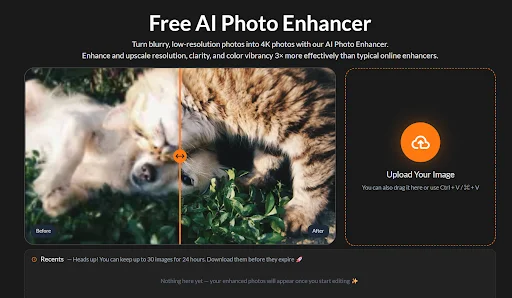
Within moments, you’ll see your results. Most platforms show a side-by-side comparison: your original bad photo next to the AI-fixed version. This instant preview is crucial because it lets you verify the improvement before downloading. The difference is often dramatic enough to seem almost magical—details emerge from murky shadows, blurry subjects snap into focus, and muddy colors become vibrant and clear.
If the first attempt doesn’t fully solve your problems, try different enhancement modes. Maybe your photo needs stronger correction, or perhaps a specialized mode for old photos or digital art. This experimentation takes seconds per attempt, making it easy to find the perfect fix.
Tackling Specific Problems Fast
Saving Blurry Disasters: Motion blur and camera shake can ruin otherwise perfect moments. AI sharpening algorithms analyze the direction and intensity of blur, then reverse these effects through sophisticated mathematical models. The results aren’t just sharper—they reveal details you might have assumed were gone forever. Sports photos, candid shots of moving children, and hand-held nighttime images all benefit enormously from blur correction.
Rescuing Dark Photos: Underexposed images hide potential behind darkness. AI brightening does more than simply increase overall brightness, which would make dark photos look washed out. Instead, it intelligently adjusts different tonal ranges, lifting shadows while protecting highlights, revealing hidden detail while maintaining natural contrast. Photos taken in dimly lit restaurants, evening events, or poorly lit interiors transform from unusable to impressive.
Cleaning Up Noisy Images: Grain and noise make photos look amateurish and low-quality. AI noise reduction analyzes patterns to distinguish between actual image content and unwanted speckles, removing the latter while preserving the former. The result is smooth, clean images that look like they were shot with professional equipment in good lighting, even when they weren’t.
Fixing Color Problems: Color casts and poor white balance can make entire photos look wrong. AI color correction identifies unnatural tints and neutralizes them, restoring accurate colors automatically. That sickly fluorescent green disappears, overly warm orange tones cool to natural warmth, and washed-out hues regain their vibrancy.
Understanding Limitations and Expectations
While AI photo repair is remarkably powerful, setting realistic expectations helps avoid disappointment. Completely blank areas with zero information cannot be reconstructed—if a bright sky is entirely white with no detail remaining, AI cannot invent cloud textures that never existed in your capture. Similarly, extremely small or heavily damaged images have limited recovery potential because there’s simply not enough data for the AI to work with.
The best results come from photos that have problems but still contain underlying information. A dark photo that shows some detail when you really squint at your screen will enhance beautifully. A blurry image where you can still make out rough shapes will sharpen impressively. But an image so degraded that it’s nearly abstract won’t fully transform into pristine clarity.
This doesn’t mean severely damaged photos are hopeless—AI can still make them significantly better, just not perfect. Often, improving a terrible photo to merely “okay” is exactly what you need. That memory becomes viewable and shareable again, even if it won’t win photography awards.
Conclusion
The ability to quickly fix bad photos changes how we think about photography entirely. You no longer need perfect conditions or expensive equipment to capture memorable images. Imperfect photos taken in challenging situations can be rescued. This removes pressure from important moments—you can focus on experiencing events rather than obsessing over camera settings, knowing that AI can improve results later.
Older photos gain new life as well. That box of old prints from decades ago, or early digital images from primitive phone cameras, can be scanned or uploaded and dramatically improved. Family memories once relegated to dusty albums can be restored, enhanced, and shared with new generations in crystal-clear quality.
The speed of AI photo repair democratizes quality. Professional results that once required professional skills and time are now available to everyone instantly. Your bad photos aren’t permanent failures anymore—they’re just temporarily unenhanced images waiting for a quick AI fix.