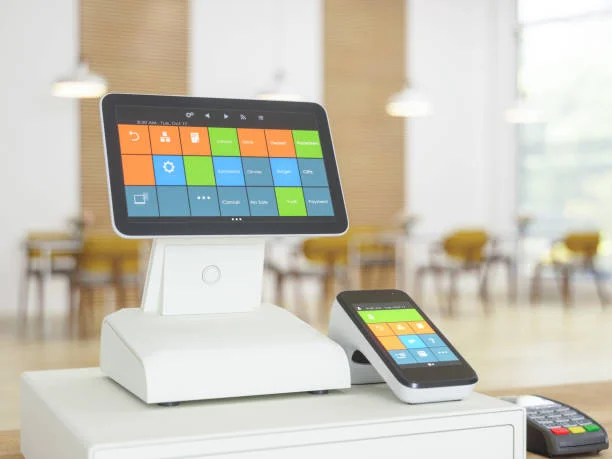
A POS system in Australia is the central system that manages sales, payments, reporting, stock, and staff operations in a business. Whether you run a café in Melbourne, a retail store in Sydney, or a takeaway shop in Brisbane, your POS system controls how money flows through your business.
In 2026, a POS system is no longer just a cash register. It is a cloud-based business management tool that connects payments, inventory, reporting, online sales, and customer data into one practical workflow.
This guide explains what a POS system is, how it works in Australia, how much it costs, what features matter, and how to choose the right setup.
What Is a POS System?
POS stands for Point of Sale. It is the place where a transaction happens between a business and a customer.
A modern Australian POS system includes:
- Sales processing
- EFTPOS and card payments
- Tax and GST calculation
- Inventory tracking
- Sales reporting
- Staff management
- Customer tracking
- Online ordering or eCommerce integration
Popular POS providers operating in Australia include:
- POSApt
- Lightspeed
- Shopify
- H&L
Each system has strengths depending on whether you are in retail, hospitality, or multi-location business.
How a POS System Works in Daily Operations
Understanding the daily workflow is more important than reading a feature list.
Step 1: Sale Entry
A staff member selects products or menu items on:
- Tablet
- Touchscreen terminal
- Handheld device
- Self-service kiosk
The system calculates GST automatically and applies pricing rules, discounts, or surcharges if required.
Step 2: Payment Processing
The POS connects to a payment terminal. In Australia this usually includes:
- EFTPOS
- Visa and Mastercard
- American Express
- Apple Pay
- Google Pay
Some POS companies require you to use their own merchant facility if you choose a free plan. This means you must select the POS provider first before finalising your payment processing agreement.
Step 3: Inventory Adjustment
When a sale is processed, stock levels update automatically.
For example:
If you sell 10 burgers, the system reduces:
- Buns
- Beef patties
- Cheese
- Sauce
This prevents stockouts and helps with purchasing decisions.
Step 4: Reporting and Analysis
The POS generates reports such as:
- Daily sales
- GST summary
- Payment reconciliation
- Best-selling items
- Staff performance
- Hourly sales trends
Owners can view this from a laptop or mobile phone if using a cloud POS system.
Types of POS Systems in Australia
Retail POS System
Used by:
- Clothing stores
- Grocery stores
- Electronics retailers
- Gift shops
Key features include:
- Barcode scanning
- Stock variations (size, colour)
- Supplier tracking
- Purchase orders
- Customer loyalty
Hospitality POS System
Used by:
- Cafés
- Restaurants
- Pubs
- Takeaway shops
Key features include:
- Table management
- Split bills
- Modifiers
- Kitchen display system
- Course control
Retail and hospitality workflows are different. Choosing the wrong type creates daily operational issues.
Mobile POS
Mobile POS systems run on tablets or smartphones.
Best suited for:
- Market stalls
- Food trucks
- Small pop-up stores
Lower hardware cost and easier setup.
Cloud POS System
Most modern POS systems in Australia are cloud-based.
Benefits include:
- Real-time reporting
- Automatic backups
- Multi-location control
- Remote access
- Integration with accounting software
A cloud POS system allows business owners to check performance even when not on-site.
How Much Does a POS System Cost in Australia?
Costs vary depending on the provider and business size.
Software Subscription
Typical range:
- $0 to $150 per month per terminal
Free software usually requires you to use the provider’s payment processing.
Hardware Costs
Estimated hardware ranges:
- Tablet: $400 to $800
- POS touchscreen terminal: $1,200 to $2,500
- Receipt printer: $250 to $500
- Cash drawer: $150 to $300
- Barcode scanner: $150 to $400
Hospitality venues may also require:
- Kitchen display screen: $600 to $1,200
Transaction Fees
Most Australian POS systems charge between:
- 1.6% to 2.2% per transaction
This depends on:
- Card type
- Volume
- Merchant agreement
Always calculate the total annual cost including transaction fees, not just the monthly subscription.
Essential Features Australian Businesses Should Look For
Easy-to-Use Interface
If staff cannot learn the system quickly, service slows down.
Test how long it takes to:
- Add new product
- Process refund
- Split payment
- Apply discount
Reliable Support
Ask:
- Is support Australian-based?
- Is phone support available?
- What happens if the system crashes during peak hours?
Support quality often matters more than price.
Inventory Management
A strong POS system should:
- Track stock in real time
- Alert low stock levels
- Generate purchase orders
- Provide stock movement reports
Poor inventory control directly reduces profit.
Integration Options
Look for integration with:
- Accounting software
- Online ordering
- eCommerce
- Loyalty systems
- Payroll systems
Integration reduces double handling and manual errors.
Reporting Clarity
Reports should answer practical questions:
- What is my profit margin?
- Which products are slow moving?
- Which days are quiet?
- What are my busiest hours?
Clear data supports better decisions.
Common Mistakes When Choosing a POS System
Choosing Based Only on Subscription Price
Low monthly fees can be offset by higher transaction costs.
Always compare full yearly expenses.
Ignoring Workflow Fit
A system designed for retail may struggle in hospitality environments.
Test real-life scenarios before signing.
Locking Into Long Contracts
Some providers require 12–36 month agreements.
Understand exit fees before committing.
Underestimating Training Time
Complicated systems increase staff errors.
Choose intuitive design.
Practical Step-by-Step Guide to Choosing a POS System in Australia
Step 1: Identify Business Type
Retail or hospitality?
Single site or multi-site?
Online sales required?
Step 2: Estimate Monthly Sales Volume
Transaction fees matter more as sales increase.
Higher volume businesses should negotiate rates.
Step 3: List Must-Have Features
Examples:
- Table management
- Barcode scanning
- Online ordering
- Loyalty program
- Multi-location reporting
Avoid paying for features you will not use.
Step 4: Request a Demo
Test:
- Speed of transaction
- Ease of refund
- Report generation
- Inventory adjustment
Practical testing prevents regret.
Step 5: Calculate Total Cost of Ownership
Include:
- POS Software
- POS Hardware
- Transaction fees
- Add-ons
- Support fees
Look at 12-month cost, not just monthly price.
When a POS System Increases Profit
A good POS system improves profitability by:
- Reducing stock waste
- Identifying high-margin products
- Speeding up service
- Reducing staff errors
- Preventing theft
- Improving cash flow tracking
Example:
If sales data shows strong demand for one product on weekends, you increase stock levels and promote that item. Revenue improves with minimal extra effort.
Data-driven decisions create steady growth.
Do Small Businesses Need a POS System?
Yes.
Even small operators benefit from:
- Accurate GST reporting
- Faster reconciliation
- Digital payment integration
- Sales tracking
- Basic inventory control
Manual systems create blind spots.
In Australia’s competitive environment, clarity matters.
Final Thoughts
A POS system in Australia is more than a payment tool. It is an operational control system that influences efficiency, profitability, and growth.
The right system should:
- Match your business workflow
- Provide clear reporting
- Integrate payments smoothly
- Be easy to train
- Offer reliable support
- Scale with your growth
Before choosing, test real scenarios. Compare full annual costs. Think long-term.
A well-selected POS system gives you visibility, control, and stability in an increasingly competitive Australian market.
Keep learning with strategies that truly work at Management Works Media.