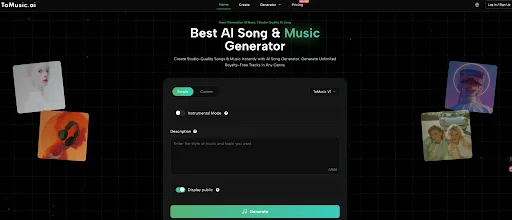
Publishing content consistently is hard enough—music shouldn’t be the thing that slows you down. If you’ve ever spent more time searching for background music than editing your video, it’s time to switch workflows. With Text to Music, you can describe the vibe you want and generate original audio in minutes—so your music fits your content instead of forcing your content to fit a random track.
This is a problem-solving soft guide designed for creators and marketers who need fast, brand-safe music for YouTube videos, TikTok/Reels edits, and ad creatives.
Why Background Music Becomes Your Bottleneck
Time Drain: Searching Takes Longer Than Creating
The typical “find a track” workflow looks like this:
- Open a stock music site
- Preview 20–60 tracks
- Download a few options
- Drop them into your timeline
- Realize the tempo/mood doesn’t match
- Repeat
This is why a 30-second TikTok can still take an hour to finish. Not because editing is hard—but because music selection is slow.
Copyright Anxiety: Even “Royalty-Free” Can Feel Unclear
Creators don’t just want music. They want confidence:
- Will YouTube flag it later?
- Will monetization get restricted?
- Will a claim appear weeks after publishing?
Licensing language is often confusing, and the risk feels personal when your channel revenue or client work depends on it.
The “Everyone Uses the Same Track” Problem
Stock libraries are built for reuse. Popular tracks become everywhere:
- Your videos start sounding like other channels
- Your ads lose uniqueness
- Your brand’s sound gets diluted
Music isn’t a filler. It’s part of identity.
Why Traditional Solutions Don’t Scale
Stock Libraries: Too Many Choices, Not Enough Fit
Stock music is selection-based. You’re picking from what exists, then compromising:
- The track is close but not perfect
- The building happens at the wrong moment
- The melody competes with voiceover
- The length doesn’t match your cut
You end up adapting your content to the track.
Hiring Composers: Great Quality, Slow Iteration
Custom music is excellent-but not built for:
- daily posting
- weekly campaigns
- A/B testing multiple ad variations
- fast client turnaround
Time and cost make it hard to scale.
DAWs : Powerful, But Too Heavy for Most Workflows
DAWs are made for producers. For most creators and marketers:
- the learning curve is steep
- setup takes time
- You get stuck in technical details
- it doesn’t solve “I need music today”
So you’re left with a choice: generic stock, expensive outsourcing, or complex production. None are ideal at content speed.
The Solution: Text to Music
Text to Music flips the process: instead of searching endlessly for “something that works,” you generate music intentionally based on your content.
You can create music by describing:
- Use case (YouTube vlog, TikTok montage, 15s ad, product demo)
- Mood (uplifting, cinematic, nostalgic, tense, dreamy)
- Genre (lo-fi, pop, EDM, hip-hop, acoustic, ambient)
- Energy / tempo (slow, mid, fast; optional BPM)
- Instruments (piano, acoustic guitar, synth pads, strings, drums)
- Length (so it fits your edit)
Why This Matters for YouTube, TikTok, and Ads
- Speed: generate in minutes
- Originality: each track is created for your intent
- Consistency: reuse prompt styles to build a recognizable sound
- Iteration: generate 3–5 variations and pick the best fit
If you care about output and efficiency, Text to Music is simply a better workflow.
A 3-Step Workflow to Use Text to Music on ToMusic.ai
Here’s the practical process you can run every time you need music for content.
Step 1: Start With a Clear Prompt
Use this prompt formula:
Genre + Mood + Tempo/Energy + Instruments + Use Case + Length
Pro tip: If your track sits under voiceover, add:
- “minimal lead melody”
- “no busy hooks”
- “voiceover friendly”
Step 2: Generate Variations and Match Your Edit
Professional results come from comparison:
Generate 2–4 variations
Drop them into your timeline
Keep the one that fits pacing and mood best
This is faster than browsing stock libraries because every variation is already “in the right direction.”
Step 3: Export, Reuse, and Build Your Personal Brand Sound
Once you get a track that works:
- Export MP3 for quick publishing
- Export WAV for higher quality edits and polishing
- Save the prompt that worked
- Reuse your prompt style across a series to keep a consistent audio identity
If you want more scenario-based ideas and workflows, explore text to music ai for inspiration across different content types.
FAQ: The 6 Questions That Matter Most of Text to Music
Is Text to Music safe for YouTube monetization?
It depends on the platform’s licensing terms. If you monetize, choose a tool that clearly explains commercial usage rights and licensing. Avoid vague “royalty-free” claims without clear policy details.
What’s the difference between Text to Music and Text to Song?
Text to Music typically focuses on background/instrumental tracks. Text to Song often implies full song structure and sometimes vocals. Your project goal determines which is better.
How do I avoid generic-sounding AI music?
Be specific about instruments, energy, and structure (“gentle intro, bigger chorus”). Generate multiple variations and pick the best. “Short + specific” beats “long + vague.”
How long should my track be for TikTok, ads, and YouTube?
- TikTok/Reels: 10–30 seconds
- Ads: 15 or 30 seconds
- YouTube background sections: 60–120 seconds Match your edit, so the music supports pacing naturally.
Do I need music knowledge to write good prompts?
No. Think like a director: what should viewers feel, how much energy, and what instruments match your brand? If you can describe a scene, you can generate music for it.
How can I keep a consistent “brand sound” across videos?
Save prompts that work, reuse the same genre/instrument palette, and generate variations within that style. Consistency becomes a repeatable system, not a guessing game.
Conclusion
Creators and marketers don’t need more music options. They need the right music—fast, original, and usable for real projects. That’s what makes a Text to Music workflow so powerful: you describe what you want, generate variations in minutes, and choose the best match for your edit.
If you’re ready to stop browsing stock libraries and start producing soundtrack-ready audio on demand, try Text to Music for your next YouTube upload, TikTok edit, or ad creative—and feel how much faster your workflow becomes when music stops being the problem.
Keep exploring—more valuable insights are waiting for you at Management Works Media.