Touch screens are a fundamental part of many modern devices, from point-of-sale terminals to industrial equipment. Among the various types available, resistive touch screens remain a reliable and practical option, especially in rugged or controlled-use environments Resistive Touch Screen: Types, Principles, and Advantages.
This article breaks down what resistive touch screens are, how they work, their types, and the specific advantages they offer to engineers, product designers, and interface developers.
What is a Resistive Touch Screen?
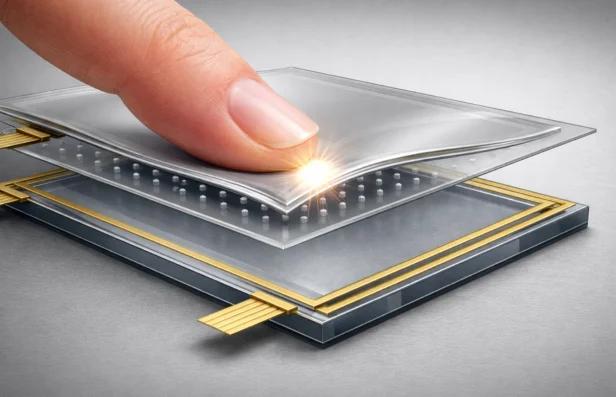
A resistive touch screen operates based on pressure. It consists of two transparent, conductive layers separated by a small gap. When a user applies pressure to the screen, the top layer flexes and touches the bottom layer. This contact changes the electrical resistance at that point, allowing the device to determine the location of the touch.
Unlike capacitive screens, which rely on the body’s electrical properties, resistive screens respond to physical pressure. This fundamental difference gives resistive technology unique benefits and trade-offs.
Types of Resistive Touch Screens
Although all resistive screens share the same basic principle, several variations exist depending on construction and wiring methods.
1. Four-Wire Resistive
This is the simplest configuration. Two wires are placed on each layer, and the device alternates voltage between layers to detect X and Y coordinates. It is cost-effective but generally less accurate and more prone to wear over time.
2. Five-Wire Resistive
In this configuration, four wires connect to the bottom layer and one wire connects to the flexible top layer. Only the bottom layer receives voltage, and the top layer acts solely as a probe. This design offers greater durability and stability, especially for high-use applications.
3. Other Variants (Six-, Seven-, and Eight-Wire)
Less commonly used, these configurations improve signal integrity or add redundancy. They may be used in speciality or high-reliability environments, but are not standard in most designs.
How Resistive Touch Screens Work
Understanding the operating principle helps guide smarter design decisions:
1. Layer Structure
The screen is made of two flexible, transparent layers with conductive coatings. These are held apart by spacer dots or micro-structures when no pressure is applied.
2. Voltage Application
A voltage gradient is applied across one layer (either horizontal or vertical). The opposite layer detects the voltage at the point of contact.
3. Touch Detection
When the top layer is pressed down, it makes contact with the bottom layer. The system reads the voltage at that contact point, determining the location on one axis.
4. Axis Switching
The process repeats with the voltage applied to the other layer, allowing the system to detect the second coordinate.
5. Release and Reset
When pressure is removed, the layers separate again, ready for the next touch event.
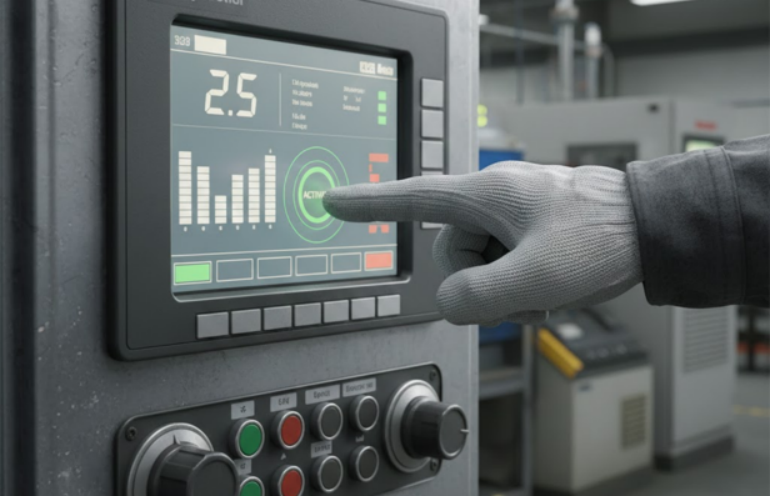
Because detection relies on pressure, these screens work with any object that can create contact, including styluses, gloved hands, or standard fingers.
This layered, pressure-based design also reflects broader advances in how functional surfaces are engineered and produced, similar to the innovations discussed in advancements in custom printing for modern businesses.

Advantages of Resistive Touch Screens
1. Input Flexibility
Resistive screens can be operated with a finger, stylus, glove, or any firm object. This makes them ideal for environments where users may wear gloves or require precise input.
2. Cost-Effective
Their relatively simple structure and materials make resistive touch screens more affordable to produce than many capacitive alternatives.
3. Reliable in Harsh Conditions
Resistive touch screens continue to function in environments with dust, moisture, or low temperatures. Since they rely on mechanical contact rather than capacitance, contaminants have less impact on functionality.
4. High Touch Accuracy
They offer precise input location detection, which is useful for handwriting recognition, signature capture, or small control buttons in tight spaces.
5. Controlled Input
Because they require deliberate pressure, they are less prone to accidental touches. This is especially useful in safety-critical applications or outdoor interfaces.
While these advantages make resistive technology a strong choice for many applications, it’s important to understand how it compares to other touch technologies.
Factors such as durability, input method, cost, and environmental performance vary significantly between technologies. For a deeper breakdown, read this detailed comparison of capacitive vs resistive touch screen technology.
When to Choose a Resistive Touch Screen
Resistive touch technology is well-suited for:
- Industrial equipment where gloves are worn, or environmental sealing is important
- Medical devices that require a stylus or gloved input
- Outdoor devices are exposed to varying weather conditions
- Budget-conscious products where advanced multi-touch is not needed
- Interfaces that benefit from controlled, single-point input
Design Considerations
When integrating a resistive touch screen into a product, consider the following:
- Durability: The top layer must flex, so choosing a scratch-resistant and chemically stable material is important.
- Optical Clarity: The layering can reduce screen brightness and contrast. Adjust backlighting or display settings to compensate.
- Calibration: Resistive screens can drift over time. Include software calibration or adjust sensitivity to maintain accuracy.
- Actuation Force: Ensure the required touch pressure is appropriate for your users, especially if they are using gloves.
- Sealing and Protection: For outdoor or wet environments, ensure the overlay and housing are sealed properly to prevent moisture ingress.
- Touch Type Limitations: Most resistive screens support single-touch only. If your application requires pinch, zoom, or multi-touch gestures, capacitive technology may be more appropriate.
What to Take Away
Resistive touch screens may not be as flashy as their capacitive counterparts, but they remain highly relevant in many applications. Their ability to work with different input types, function reliably in tough environments, and deliver cost savings makes them a solid choice in industrial, medical, and outdoor-use devices.
When selected and designed with care, resistive screens offer a dependable and user-friendly interface that meets real-world performance needs. For any project where durability, precision, and input flexibility are more important than advanced gesture support, resistive technology should be high on your list of options.
If you’re exploring how to integrate a resistive touch interface into your next product or comparing it against other technologies, I’d be happy to help you evaluate the trade-offs or build a material and performance checklist. Just let me know.
Our more posts reveals powerful ideas you don’t want to overlook at Management Works Media.