Managing inventory can get tough as your store grows, and doing everything by hand takes a lot of time. The benefits of using plugin for WooCommerce inventory management start to show when you need faster updates, better accuracy, and simple tools to handle daily work.
Plugins help with bulk edits, real-time updates, and clear reports that show what is selling well. They also support special quantities, track raw materials, and keep your store running smoothly, even with many products.
These tools make your tasks easier, save hours of work, and help you avoid common stock mistakes. If you want a smoother and smarter way to handle your inventory, keep reading to learn how these plugins can help your store grow with less stress.
Limitations of WooCommerce’s Default Inventory Management Option
WooCommerce’s default inventory system is simple but lacks many advanced features that growing online stores often need. These gaps can make managing multiple products or locations harder. Below are some major limitations that store owners may face.
- No Multi-Location Support: It cannot handle stock across several store locations or warehouses, leading to confusion when managing orders from different places. This makes tracking inventory across branches difficult and often causes stock mismatches.
- Manual Stock Updates: Stock levels must be updated manually after each sale or restock, which is time-consuming for busy stores handling many products. This increases the chance of mistakes and outdated inventory data.
- Limited Bulk Editing: Editing multiple product details at once is slow and restricted, forcing you to update items one by one. This wastes time when managing large inventories with hundreds of listings.
- No Raw Material or Component Tracking: The system cannot track materials used to make final products, which is a problem for businesses that create custom or handmade goods. Without this feature, it is hard to know what materials are running low.
- Basic Reporting and Analytics: Reports only show simple details like product counts and stock levels, offering no deep insights for smart business decisions. Without detailed analytics, it becomes hard to identify trends or improve sales strategies.
- Whole Number Quantities Only: You cannot track products sold in fractions, which is a problem for stores selling items by weight or volume. This limits flexibility for businesses that measure goods differently.
- Performance Issues with Scale: As your product list grows, the system can slow down and cause loading delays in stock management. These slowdowns can affect order processing and customer experience.
- Limited Automation Options: Most tasks like updates, reorders, and alerts need to be done manually, which takes extra time every day. Without automation, managing inventory becomes harder as sales grow.
Benefits of Using Plugin for WooCommerce Inventory Management
It can be challenging to manage your store’s inventory when things start to expand. Keeping track of items by hand takes a lot of time. Plugins make it easier by doing most of the hard work for you. Let’s look at how plugins can make your WooCommerce inventory management simple and smarter.
Better Stock Accuracy
Using a plugin helps keep your stock numbers correct at all times. It updates items as soon as they are sold or added, so mistakes stay low. You do not need to guess your actual stock anymore because everything stays updated. This makes planning easier and stops common issues like overselling during busy days.
Faster Daily Work
Tasks take less time when a plugin handles updates for you. Simple changes happen quickly without long steps or repeated clicks. You save hours that would normally go into checking items manually. This helps you focus on other tasks like sales, packing, and customer messages without feeling rushed.
Easy Bulk Editing
A plugin lets you change many items at the same time with simple tools. This is very helpful when you have large product lists that need changes. You can adjust prices, stock, or other details in one place. It keeps your work neat while saving time and lowering the chance of mistakes.
Smooth Multi-Location Support
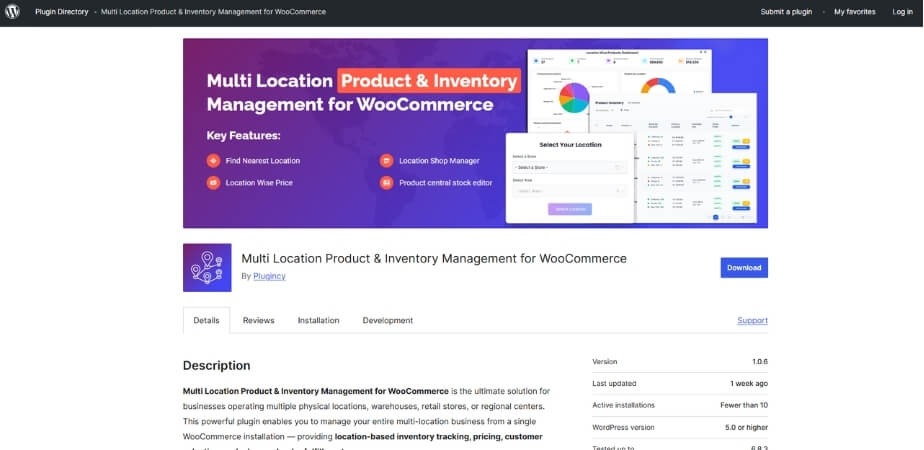
Stores that keep products in more than one place can track all stock easily, and Multi Location Inventory Management for WooCommerce helps make this process simple. Plugins show how much stock is in each location without switching pages. You see your full overview on one screen, which helps with planning. This also keeps your orders accurate when stock comes from different places.
Raw Material Tracking
If you sell items that use materials, plugins help track each part. You always know how much material is left to make more products. This helps prevent delays when you suddenly run out of a needed part. It also supports better planning so you can refill materials on time.
Clear Reporting Tools
Plugins offer simple reports that show important stock details in easy charts. You can check what sells well and what needs more stock. These reports help you make smarter choices without feeling confused. With this support, you can plan ahead and avoid sudden stock problems.
Automatic Stock Actions
Simple tasks like alerts, updates, and reorder reminders can run on their own. You do not need to check stock again and again during the day. The plugin warns you when items get low or need action. This reduces stress and keeps your shop prepared for busy times.
Works Better With Large Stores
A plugin helps your shop stay fast even when you have many products. Managing a big list becomes smooth because the tools are made for heavy use. You do not deal with slow pages or long loading times anymore. This helps keep orders moving and keeps customers happy.
Good Support for Special Quantities
Some stores sell items by weight or size instead of whole numbers. Plugins let you track items in small or mixed amounts without confusion. This gives more freedom for shops with flexible product types. It keeps your stock numbers correct even when items are measured differently.
Comparison of Inventory Management Plugin and WooCommerce’s Default Inventory Tools
WooCommerce has basic stock tools, but they often feel limited as stores grow. Plugins add more useful features that help with larger tasks and smoother work. The table below shows how both options differ in important areas.
| Aspect | Inventory Plugin | WooCommerce Default Tools |
| Multi-location support | Lets you manage stock in several locations or warehouses at once. | Doesn’t support multiple warehouse or store locations. |
| Stock updates | Updates stock automatically when sales or restocks happen. | Requires manual stock changes after each sale or restock. |
| Bulk editing | Allows editing many products at once easily and quickly. | Offers only limited bulk editing, often slow for many products. |
| Raw material/component tracking | Can track raw materials or components for assembled products. | Unable to track materials or components, only finished products. |
| Reporting & analytics | Gives clear reports, sales trends, and stock history for insights. | Only basic stock counts and minimal reporting. |
| Quantity types | Supports different quantity types (e.g., fractional, weight, volume) if needed. | Handles only whole-number quantities. |
| Performance at scale | Keeps the system smooth even with many products and orders. | Can slow down or face performance problems as inventory grows. |
| Automation of tasks | Offers auto-alerts, reorder reminders, and automatic updates. | Most tasks need manual work and repeated effort. |
Using a plugin brings many features that help a growing store run smoothly. Default tools may work for small shops with few items. If you expect growth or many items, a plugin usually offers much better control and peace of mind.
How To Pick the Right Inventory Management Plugin for Your WooCommerce Store?
Choosing the right plugin can make managing your store much easier. A good one helps you track stock, avoid errors, and save time. It should fit your store’s size and daily needs well. Read below to learn how to pick the perfect inventory plugin for your WooCommerce store.
Look for Real-Time Tracking
An ideal plugin updates your stock the moment a sale happens. This keeps your inventory data correct and always current. You won’t have to worry about selling items that are already gone. Real-time tracking makes managing products simple and helps prevent stock-related problems.
Check for Multi-Location Support
Some stores keep products in more than one warehouse or shop. A plugin that supports multiple locations keeps all stock data in one place. It helps you know where items are available without confusion. This feature is key for stores that manage products in many areas.
Ensure Low-Stock Alerts
Getting notified when stock is running low helps you restock on time. Plugins with alert systems send you reminders automatically. You never need to check the inventory again and again manually. Staying updated prevents product shortages and keeps your customers satisfied every time.
Choose One with Bulk Editing
Editing many products one by one can take forever. A good plugin allows you to make changes to many items together. You can update prices, quantities, or categories quickly and easily. Bulk editing saves time and helps you manage large product lists smoothly.
Check Reporting and Analytics
Reports help you see what is selling and what isn’t. A plugin with reporting tools gives you a clear picture of sales trends. You can use this data to make smarter business decisions. Knowing what works best helps you plan for growth and reduce waste.
Make Sure It Supports Integration
The best plugins work well with your other business tools. It should connect easily with accounting, shipping, and marketing software. This keeps your data connected and up to date across all systems. Smooth integration helps you manage everything from one place without extra effort.
Confirm Active Maintenance and Compatibility
A plugin that is regularly updated works better and stays secure. Check if the developer maintains it often and fixes bugs. Also, make sure it supports all your product types and themes. This ensures your store runs smoothly without sudden issues or crashes.
Smart Tips to Maintain Your Inventory System Over Time
Keeping your inventory system in good shape helps your store run smoothly. A well-maintained system avoids stock mix-ups and missing items. Simple habits can keep your products and data accurate throughout the year. Let’s go through a few smart tips to help you maintain your inventory system easily.
Do Monthly Stock Audits
Regular stock checks help you spot missing or extra items right away. Comparing actual stock with system data keeps numbers correct. This practice helps you notice mistakes early before they grow bigger. Doing monthly audits builds trust in your data and keeps your store well-organized.
Update Plugins Regularly
Outdated plugins can cause bugs or errors in your system. Make sure all plugins stay updated to the latest version. New updates fix old problems and improve how your store works. Regular updates keep your site faster, safer, and better at managing inventory.
Remove Outdated Products
Old or unavailable products can clutter your stock list easily. Remove them from your system to make room for new ones. This keeps your records clean and helps customers see only what’s in stock. A tidy product list saves time and reduces confusion when managing items.
Check Stock Logs Often
Logs help you see every change made to your stock. Reviewing them often helps you spot strange or wrong updates quickly. You can track who made changes and when they happened. This habit keeps your inventory transparent and avoids small mistakes turning into bigger issues.
Train Your Team Well
A system works best when your team knows how to use it right. Teach them how to update stock, record sales, and manage reports. Regular short training sessions can refresh their knowledge and prevent errors. A skilled team ensures your inventory stays correct all the time.
Keep Backup Data Secure
Sometimes systems crash or lose data without warning. Having regular backups saves your stock information safely. Store these backups in a secure cloud or external drive. This small step protects your hard work and prevents losing valuable inventory records.
Concluding Lines
When you have the proper tools, operating an online store becomes simpler. A plugin takes away the stress of manual updates and helps you keep your store accurate and organized every day. It’s like having a helping hand that never gets tired of checking your stock.
The real benefits of using plugin for WooCommerce inventory management show when your business starts growing. You can track stock across many locations, set alerts, and manage hundreds of items with just a few clicks. This saves time and cuts down mistakes that often cost sales.
A plugin doesn’t just make your job simple; it makes your whole store smarter. With better control, faster updates, and clear insights, you can focus more on customers and less on fixing stock issues.